CATEGORIES

blogging (3) facebook (4) windows8 (3)
Showing posts with label facebook. Show all posts

Saturday, 30 March 2013

What is Facebook Graph Search ?

                                       What is Facebook Graph Search ?

Facebook Graph search can be described as the modified or advanced search on Facebook to explore things in detail. With this graph search you can search for many things which your friends like, places people explored etc.

Few Examples:
If you want to know about the list of your friends (or friends of friends) who likes to cry, you can just simply type “friends who like crying” and in real time Facebook will show you the list of people who likes crying. With this you can explore new people who are with same interest of yours.
You can even filter your search results to a particular place, by typing “People who like crying in Washington” you can get the whole list of them.  Sounds pretty interesting Isn’t it?

How to get Facebook Graph search to your Facebook profile:

Facebook launched this feature just for few limited people and this is now available to everyone.
When I checked it, this feature is even disabled for me, which means enough number of people is already trying this. Keep checking that page to join the waiting list.

Facebook Layout with Facebook graph search:

This is how the Facebook layout of an account looks like when Graph search is enabled on a profile
facebook+graph+search+enabled+for+a+profile
Friends requests, Messages and notifications icons which are normally at the left top of our Facebook profile. But when Facebook graph search is enabled on your profile they get shifted to the right top just besides the profile button. At the place where we used to see the normal search box, we can see Facebook new Graph search coming into action.

Difference between Google search and Facebook Graph search:

Though we can get any sort of search results accurately using Google, we can’t get the search results that can be provided by Facebook..! Let me tell why. . If you search for people who likes playing cricket on Google it will show you some results, and if some other person did a search on Google for the same thing it shows the same results. No matter who you are Google will just show the same results for you every time. But in the case of Facebook each and everyone will get separate results depending upon the interests of their friends. This makes the things even better. You can even search for places which your friends visited, Places which your friends recently visited. etc.

Conclusion:

When Facebook introduced Timeline features to its users many people searched desperate to remove it from their profile as many didn’t felt comfortable with that new layout of profile. But later people get went with it without any regret and now everyone is addicted to it. But as soon as Facebook introduced this Graph search, people started responding in a quite positive manner towards it. I am pretty sure that this will make the Facebook even better.


How to Give Maximum Protection to your Facebook Account

 How to Give Maximum Protection to your Facebook Account

          Why Hackers try to hack your Facebook Account?
  • To Steal Information:The main motto behind hacking your account can be stealing information.As Facebook is a place where you interact with every person and discuss various issues like personal matters,business deals,Education etc.So some one might wanted to know your secrets about your Personal/Professional life will try to hack your account or hire any expert to hack your account.
  • To ruin your Business:For few people Facebook is not just a social networking site but its a great platform for many people to expand their business and get wide popularity in just few days.Even for a blogger like me,my Facebook account is very precious for me as it is one of the major traffic source for my blog and also my Facebook Fanpage which has about 2000 Followers.If such an account gets compromised then I will be loosing Facebook Fanpages and many other groups linked with that account.
Also Read:How To Get Mor Likes For a Facebook Fanpage/Increase Facebook Likes.
  • For Money: As I already said that your Facebook account is not just an account but its linked with your Personal/Professional life.Some people might sell/hack your account to earn money.
  • Just For Fun: Now this sounds weird but its true.Few hackers just hack Facebook accounts randomly for fun.Having passion to become a hacker is not a bad thing but using your skills in a wrong way may take such people into danger.
  • Even though there are hundred other reasons why your Facebook can be hacked,the above stated are just few common reasons why most of the accounts gets compromised.

Does Facebook give Good Security to its users?

The answer is Yes.Facebook is very much concerned about its security of its users.Though the privacy is not that good on Facebook but security measures are very high.Its highly difficult to compromise a Facebook account unless and until the Facebook user ignores few security measures and falls into trap of the hacker.

Steps to Protect Your Facebook Account:

1.Keep a Strong Password:

This is the first thing every user must take care of.
Its very unfortunate to inform you that most of the passwords are either password/phone numbers/nick names/Date of births.
This makes your account very weak and it will be very easy to compromise your account by guessing your password if the other person knows you personally or just few details of yours.
A strong password must contain atleast 8 digits with Small Letters (a,b,c etc), CAPS(A,D,E),Numbers(5,43) and special characters(_,@,$).

2.Setup Very Strong Security Question: 

80% of the accounts are hacked by answering security question.Most of the people ignore and become lazy while setting up their security question and for the name sake they keep some nickname/Native places as their security question.A person knowing a little information about you can easily compromise your account by answering security question.
  • If you have not yet setted security question to your Facebook Account ,Go to Account Settings->Security Tab there you can see the option setting up security question.
  • If you have already setted up security question for your account then this option will not be visible to you.
  • Facebook doesn't allow you to change your Security Question for security reasons.

3.Turn On Secure Browsing:

Always browser on secure https.The green https in your browser url denotes secure browsing where as yellow/red mark on https denotes insecure browsing.
Secure+https

Steps to Turn on Secure Browsing:

1.Go to Account Settings.
Facebook+Account+Setting
2.Then on the left side click on Security Tab.
3.In Security click on Secure Browsing and check the Box "Browse Facebook on a secure connection (https) when possible" then save the changes.

Enable+Secure+Browsing

4.Turn On Login Notifications:

By turning on login notification you will get a message to your email/phone whenever you login from a new device.Facebook mobile service is very poor and you rarely get any message from them to mobile but their email notifications service is pretty good and fast.
  • Go to Login Notifications and Check both boxes then save the changes.
Login+Notifications

5.Set a different Password for Applications:

We daily use many applications on Facebook.Most of them wont ask you for password but rarely you will find few applications that asks your password to access the application.Most of the times such kind of applications will turn out to be phishing scams.So Facebook has taken an advanced step and gave users an option to set a different password for applications.
  • To set A Temporary password for applications go to App Password and click on generate.
App+Password

6.Keep the account which is linked to Facebook Safe:

Your Facebook account may either linked to Gmail,Yahoo,Hotmail etc.In order to protect your Facebook account you must give good protection to your linked accounts.

7.Maintain Separate Public and Private Email Addresses:

As I already said that you must keep your linked account safe in order to keep your Facebook account safe.So better keep the email id linked to Facebook as private and dont share with others.

8.Hide your Primary Email ID from Other:

1.Go to your Account Info.
2.In Contact Info Section click on Edit button.
3.Now if you are asked to enter your password enter your password and submit.
4.Then you can set the preference as you like to your primary email address.
5.Choose only me if you want to hide it from others.
Hiding+Primary+Email+ID

9.Keep a Glance at Recognised Devices:

Facebook asks you for device name whenever you login from a new device.Facebook stores the names of all these devices in your Recognised Devices section.If anytime you see any suspicious device click on remove.
Recognized+Devices

10.Do not fall for Scams:

Facebook is the #1 target for scammers.They try to scam each and every possible way to trap you to hack your account and to earn money.
Most of the common scams you see on Facebook looks like Removing Facebook Timeline,Check out who viewed your profile most.
Timeline+Removal+Scam

After timeline has introduced and once you enabled it then its not possible to remove timeline.Also there is no such application which helps you to know who viewed your profile most,Facebook doesn't allow this.Such things are very eye catching and most of the people want to know such things so they give a try and fall in trap.Such kind of things are the primary targets for scammers ,Beware of such things.

Conclusion:Learn Few things about Hacking:

The last but very important is knowing few things about hacking.I am not forcing you to learn hacking but you must know few common attacks by which your account can be compromised.The most widely used attacks are Phishing,Keylogging.Know a little about these things to stay away from such attacks.

How To Remove Facebook Timeline Easily

                                              How To Remove Facebook Timeline Easily 
 
Facebook recently launched new feature called Facebook Timeline.Some facebookies like Timeline and some hate it but there was no response from facebook on How To Remove Facebook Timeline for those who didn't like this feature.

Still not using Facebook Timeline then get from the below link:

Update On Removing Facebook Timeline Easily:

Now you can easily Remove Facebook Timeline using this service called Timeline Remove for Google Chrome,Mozilla Firefox,Safari and Internet Explorer.
  • Go to Timeline Remove.
  • Scroll Down and select your browser.
  • Download and Install the extension for your Browser.
  • Then just restart the browser,your Facebook Timeline will be disappeared.

Other Ways To Remove Facebook Timeline:

Mozilla Firefox Users:

Step 1:Go to this [link] and install User Agent Switcher Addon then restart your Browser.
Step 2:Open Firefox, Press the Alt Key > Open Tools > Default User Agent > Internet Explorer and choose Internet Explorer 7.
Firefox+user+agent
Step 3:Open your facebook and refresh your profile page(Ctrl+F5).Thats it now you will get your old profile back with some errors like extra spaces,formatting etc.To remove those errors install this addon for firefox[link]

Google Chrome Users: Update:Follow the below link to Remove Facebook Timeline for google chrome:

Step 1:Right click on Chrome.exe Icon and go to Properties.
Step 2: Make sure you are in the ‘Shortcut’ Tab.
Step 3: Paste the following code in the Target window after the : “C:\Program Files\Google\Chrome\Application\chrome.exe”
CODE – For Windows Vista & Windows 7 Users.
–user-agent=”Mozilla/4.0 (compatible; MSIE 7.0; Windows NT 6.0)”
CODE – For Windows XP Users.
–user-agent=”Mozilla/4.0 (compatible; MSIE 7.0; Windows NT 5.1)”
Note: Leave space between
“C:\Program Files\Google\Chrome\Application\chrome.exe”<SPACE>–user-agent=”Mozilla/4.0 (compatible; MSIE 7.0; Windows NT 6.0)”
How+to+deactivate+facebook+timeline
Step 4:Open your facebook and refresh your profile page(Ctrl+F5).Thats it now you will get your old profile back with some errors like extra spaces,formatting etc.To remove those errors install this addon for firefox[link]

Update:Follow the below link to Remove Facebook Timeline for google chrome:

Safari Users:

Step 1:Open Safari Browser, go to the Preferences menu > Advanced > Tick the “Show Develop menu in menu bar” option.
Step 2: Click the page icon menu (next to the Gear icon near Search Bar) then select the Develop/user agent menu, Choose the User Agent as Internet Explorer 7.
Step 3:Open your facebook and refresh your profile page(Ctrl+F5).Thats it now you will get your old profile back with some errors like extra spaces,formatting etc.To remove those errors install this addon for firefox[link]

Internet Explorer:

Our Tweak is to set all the user agents to Internet Explorer 7.So if you are using Internet Explorer 7 then by default you don't get facebook timeline.If you are using updated version then follow the below settings.
Step 1: Open Your Facebook Profile Page.
Step 2: Press Alt Key. Click on Tools > Compatibility View Settings.
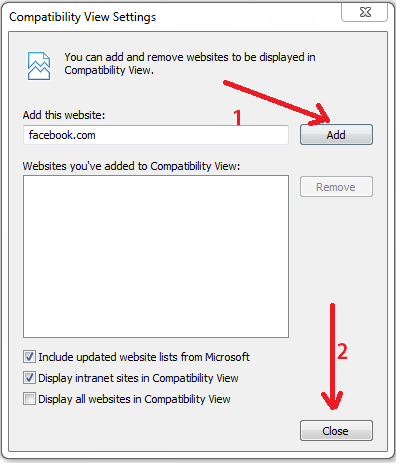
Step 3: If facebook.com is already filled in, Click on Add else fill in facebook.com and Click on Add followed by Close.
Interent+Explorer+Compatibility+View+Settings
Step 4:You are done just refresh the page.

So friends I hope you are able to Remove Facebook Timeline.If you have any trouble then please leave your comment.Those who have successfully Removed Facebook Timeline Share your experience.
Note:There is no response from facebook on disabling timeline feature so here we are going to perform a Browser Tweak to disable timeline that will get you back the old facebook view.This will appear only to you and other will be able to see your Timeline Profile.

Best Facebook Tricks You Might Not Know 2013

1.Watch Streaming TV Live on Facebook:

There is a Facebook Application that provides free streaming live TV channels on Facebook.You can watch a lot of International Channels using this Application.I am able to watch live channels without buffering on my 2G connection.This application is totally at free of cost.2012 Olympics are also broadcasted on this channel.
Application Used:http://apps.facebook.com/tvdream-app/

2.Send SMS from Facebook:

Yes you are right now you can send sms from facebook.There are no country restrictions.You can send sms to any country.The message sending is instant and takes only few seconds to reach the destination.All this is possible with a cool facebook application.
Send+sms+from+facebook
  • Select your country.
  • Then in the next line enter the mobile number to which you want to send sms.
  • After that enter your message that you want to deliver.
Limitations:
  • You can send only sms upto 100 characters long.
  • You can only send 4 SMS per day.
  • Dont do any illegal things with this service as it will first display your name at the beginning of the message.

3.Create a Video With Your Pictures on Facebook:

You can easily create a video with your Facebook Pictures.To create a video with your facebook photos go to pixable.com[click here].

4.Delete Facebook Account Permanently:

Most of them are confused between deleting and deactiving their Facebook Account.Deactivationg is completely different from deleting your account permanently.To avoid confusion just follow the below link to delete your facebook account permanently.

5.Trick to download facebook Photo Album-Link:

Follow this link to know how to download facebook photo album in  a single click.

6.Trick to see who is online when you are offline:

Sometimes it becomes necessary to check who is online which being offline.At such times there is a very cool Facebook Application which can make your job easy.Use the below application to know who are online while you are offline.

7.Trick to publish empty status:

Login to your facebook account.Then click on update status and enter the following code and hit enter.
@[2:2: ]

8.How to find who deleted/Unfriended you on facebook?

You can find who deleted or unfriended you on facebook using an application called who delete me[click here].
This application will back up all your friends list when you sign up for the first time and notifies via mail whenever there is a change in your friends list.

9.Download Videos From Facebook For Free:

To download videos from facebook go to Downfacebook.com[click here]
There put the Facebook Url of video and your video will be ready to download.

10.Place Facebook Chat on Firefox Sidebar:

Place+chat+box+in+mozilla+sidebar
  • Open Mozilla Firefox browser and press Alt key.
  • Select bookmarks and select "show all bookmarks"
  • A box will open from that select unsorted bookmarks > organise >  new bookmark.
  • Again a box will open in that type "facebookchat" in first boxand type "  http://www.facebook.com/presence/popout.php " in second box .
  • Click on load this bookmark >add.
  • Now again press alt key > view > side bar > bookmarks>.
  • Then select facebook chat from the bookmarks in slide bar.
  • You are done.Now you will be able to see chat bar on the left side of your Mozilla Firefox Browser.

11.Post your Status in All Facebook Groups in a Single Click:

Some times you want to post your status or write message in all groups.If you do the job manually then its a time consuming frustrating process and you end up in posting your status only in few groups.But now your job has become very easy.There is a facebook application using which you can post your Facebook status in any number of groups you wish.
Using Multiple Post Application you can make your job easy to post your status in multiple groups.

12.Tips and Tricks to get more likes for your Facebook Fanpage:

Now a days almost most of the Facebook users have some Facebook pages.May be it is Music,Dance , Actor,Brand Page,whatever page it may be all you need is to get more likes for that fanpage.I listed few Tips and Tricks using which you can get more likes for your fanpage just follow the below link.
You might have known that you can add smileys and emotions in your Facebook Chat Box.Not only smileys but also you can add any picture in your facebook chat box.
Chat tricks will enhance your ability of using facebook and with these tricks you can easily impress your friends while chatting.
I already posted few Status tricks.This is a very cool trick using which you can update your facebook status via Blackberry,Iphone,Android,Ipad etc using Facebook Applications.
There are many such applications, I mentioned few best applications. Follow them and update your status.
status+update+via+blackberry

Read more: http://www.alltechbuzz.net/#ixzz2P0SedMPI